Untested Levels settings: every input explained
Untested Levels works the moment you add it: it recognises your ticker and draws the earlier levels the market has not traded back to. When you want to change what you see — which elements, how far back, the look of the lines and labels — everything is in the settings window. This page explains every setting.
On this page
Part of Untested Levels
Free TradingView indicator that marks earlier closes, opens and gaps the market has not traded back to — on index, futures and CFD charts.
Install Untested Levels (free) →Opening the settings
Double-click the name Untested at the top left of your chart, or hover over it and click the gear icon . Everything on this page is in the Inputs tab, in this order: Help screens, the five element groups, General, Cash-future diff and Debug. Hover over an i to read the explanation of a setting. The Style tab holds TradingView's own display options; for a clean chart untick Values in status line and Inputs in status line there — see TradingView tips for a clean chart.
Settings per element
Untested Levels draws five kinds of earlier levels. Each has its own group with the same building blocks; the numbers match the screenshots (8 is in the gap groups, below).
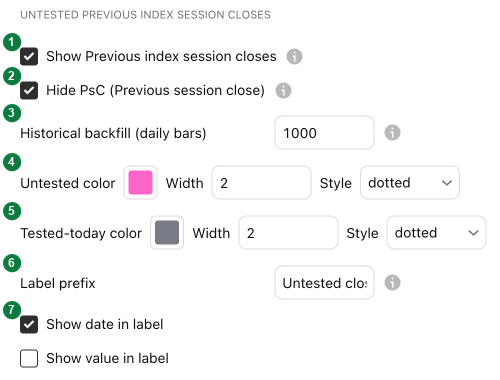
| 1 · Show | Switches the element on or off. All five are on by default. |
|---|---|
| 2 · Hide … | Closes and opens: leaves out the most recent one — yesterday's close, today's open — because Basics already draws it. On by default. |
| 3 · Historical backfill (daily bars) | How far back to look for levels that are still untested: up to 1000 trading days by default, about four years. |
| 4 · Untested colour, width, style | The look of a level that price has not reached yet. |
| 5 · Tested-today colour, width, style | The look after price reached it today (grey by default); the next day the level is gone. |
| 6 · Label prefix | The text at the start of each label; clear it to show only the date. |
| 7 · Show date / value (size) in label | Adds the date of the level (on by default) and its price or, for gaps, its size (off). |
| 8 · Min gap size (points) | Gaps only: hides gaps smaller than this. 0 shows every gap. |
The gap groups use a fill and a border instead of a line, and have a Min gap size (8):

The five elements:
| Untested close index | Earlier closing prices of the index that price has not traded back to. |
|---|---|
| Untested open CFD | Where the market stood when regular trading hours opened on an earlier day, as long as price has not returned there since. |
| Untested open index | Earlier official opening prices of the index that price has not returned to. |
| Gap index | Gaps on the index that have not been filled; after a partial fill the box is smaller from the next day. |
| Gap future | The same kind of gaps, measured on the main future; a filled future gap keeps its colour for the rest of that day. |
Help screens

| 1 · Info | A welcome panel in the middle of the chart. Off by default. |
|---|---|
| 2 · Supported tickers | A panel with every ticker Untested Levels recognises. Off by default. |
| 3 · Size | The text size of both panels. |
| 4 · Delayed-feed notice | A small note when the main future's data arrives 5 minutes or more behind the clock, because there is no real-time subscription. On by default. |
| 5 · Seconds-chart notice | A small note on a seconds chart while levels are hidden because the chart loads too little history to measure the cash-future difference. On by default. |
General

| 1 · Label color, size | Text colour and size of all labels (default 12 pt). |
|---|---|
| 2 · Label spacing threshold, stagger spacing | Labels at almost the same price are spread out sideways so their text doesn't overlap. |
| 3 · Level visibility range | A level is only drawn while it is within this distance of the current price. Default 25 % — wide, because untested levels can be far away; lower it for a calmer chart. |
| 4 · Line end, right offset | Where lines and labels end on the right: a few candles past the current one (default 5), or at the end of the session. |
Cash-future diff
Untested Levels converts index levels to futures charts, and the future gaps to index and CFD charts, with the current cash-future difference. This group sets, per market, where that difference is measured. The defaults work without a paid data subscription — in real time, except for the AEX, where the free data is 15 minutes delayed — so in most cases you leave this group as it is. If a field returns no data, a small warning appears and the converted levels are hidden until it is fixed.
Debug
Handy when a level is not where you expect it, or when you send a question.

| 1 · Show debug table | A table with what the indicator recognised and calculated. Off by default. |
|---|---|
| 2 · Debug page | Which of its three pages the table shows. |
| 3 · Debug text size | The text size of the table. |
Frequently asked questions
How do I get the original settings back?
Open the settings, click Defaults at the bottom left and choose Reset settings.
Why don't I see yesterday's close or today's open?
Basics draws those (PsC index, RTH O and RTH O index), so Untested Levels hides them by default. Switch off the Hide … option of that group if you run Untested Levels without Basics.
Why are there so many lines?
By default every untested level within 25 % of the price is drawn. Lower Level visibility range under General to see only the nearby ones, or lower the historical backfill of a group.
How do I hide small gaps?
Set Min gap size (points) in the gap group: gaps smaller than that are not drawn.
Can I add the price to a label?
Yes. Each line group has Show value in label, each gap group Show size in label.
Set Untested Levels up your way
Untested Levels is free on TradingView. Add it next to Basics and the untested levels appear by themselves.